
The Terminal with Speed and Features.
Every terminal emulator was either blazing fast or packed with essential server management tools. Nothing had both. So we built AZTerm.
Install AZTerm
v0.6.5Full OS integration: app launcher icon, Dolphin/Nautilus context menus, and URI protocol handlers.
curl -sSL https://raw.githubusercontent.com/AZBrandCanada/azTerm/main/install.sh | bash
Faster Engine. Sharper Rendering. Smarter Reattach.
This release replaces the entire terminal parsing pipeline, ships a full Nerd Font inside the binary, and fixes every TUI that uses modern xterm mouse protocols. If you use btop, neovim, helix, or tmux, this is the update for you.
Rebuilt Terminal Engine
Swapped the VT state machine for a battle-tested, GPU-grade parser. btop’s Braille graphs, vim / neovim floating windows, helix, micro, lazygit and every wide-character or CJK cell now render at correct width and alignment — no more cursor drift, no more ghost columns.
Full Mouse Support in Every TUI
Modern full-screen apps (btop, neovim with mouse=a, helix) enable xterm mouse mode 1002 instead of the older 1000. AZTerm now forwards clicks, drags, and hover motion correctly across all three protocols, so every button in every TUI responds on the first click.
Nerd Font Shipped Inside the Binary
A full Nerd Font is embedded into the executable, so Braille glyphs, box-drawing characters, Powerline separators, and every icon set render identically on every install — AppImage, .deb, Flatpak, cargo install, or manual build. No system font hunt, no fontconfig lookup, no “works on my machine”.
Session Reattach Restores Modes
The background daemon now observes DEC private mode toggles (alt-screen, application cursor, mouse reporting, bracketed paste) as bytes flow through it, and replays a short mode preamble to every reattaching client. Reboot, reopen AZTerm, and your btop / vim / tmux session comes back exactly as it was — including its input state.
Why Are Terminal Emulators Broken Into Two Extremes?
If you manage cloud infrastructure, VPS nodes, and remote servers every day, you were forced to make an annoying compromise:
Extreme 1: Fast but Barebones
Minimalist GPU Terminals
They open in 20 milliseconds and use almost zero RAM. But they give you zero GUI features: no visual split docking, no SSH bookmark organizer, no live SFTP file drawer, and no graphical color or opacity adjustments. You are forced to memorize configs or run separate utilities.
Extreme 2: Feature-Rich but Bloated
Electerm, Tabby, Hyper, Web Terminals
They offer features like SSH bookmarks and file trees, but they are built on Electron & Chromium. They consume 400MB to 700MB of RAM just to idle, take seconds to launch, and introduce noticeable input latency on every keystroke.
Native Rust GPU Speed + Full GUI Feature Suite
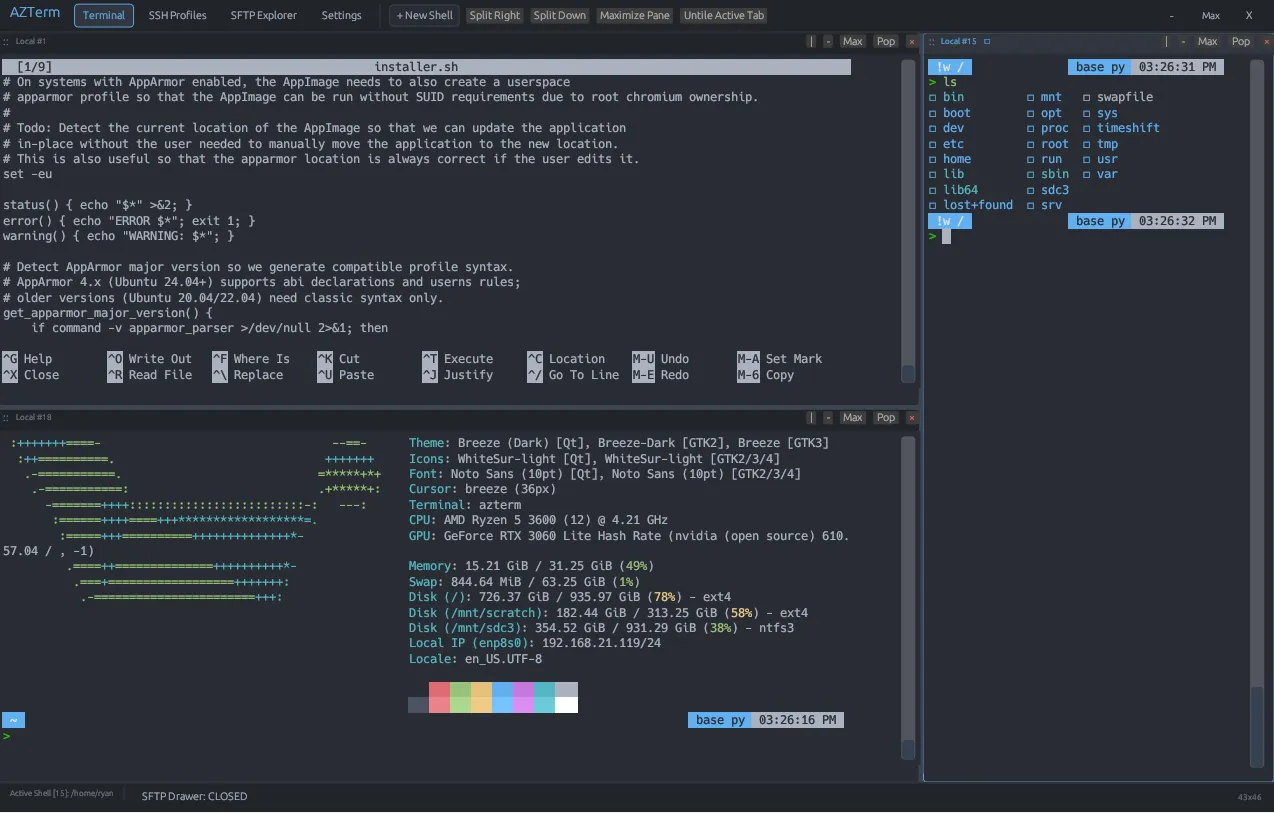
AZTerm bridges the gap. Built from scratch in pure Rust with immediate-mode hardware GPU rendering and POSIX kernel PTYs, it delivers the raw throughput of the fastest native terminal engines with all the visual drag-and-drop tiling, SSH bookmarks, SFTP sync drawers, and persistent background sessions you actually need.
Sessions That Never Die
AZTerm runs your shells, SSH connections, and long-running commands in a background daemon. Close the window — even reboot — and everything reattaches exactly where it was: same tabs, same tiling layout, same scrollback, same running processes, same terminal input modes.
Engineered for Serious System Administration
Drag & Drop Tiling & Split Panes
Split panes side-by-side (Ctrl+Shift+D) or stacked (Ctrl+Shift+E). Drag any pane by its handle (::) or tab onto Left, Right, Top, or Bottom dock zones with live snap preview highlights.
50,000-Line History & Anchored Selection
Retains up to 50,000 lines per session. Highlighted text stays locked to absolute buffer coordinates as you scroll. Includes auto copy-on-select, right-click paste, and smooth progress-bar carriage return handling.
30 Presets, ANSI Editor & Opacity
Choose from 30 curated dark and light presets, or duplicate to create custom themes. Edit the full 16-color ANSI palette with live color pickers and adjust window transparency from 0% (fully transparent) to 100%.
SSH Multiplexing & Dual SFTP
Terminal connections share OpenSSH sockets via ControlMaster. The SFTP transfer queue reuses this authenticated tunnel with zero duplicate logins, and the pane automatically follows your cd on each tab.
Ed25519 Key Generator & Vault
Generate Ed25519, RSA-4096, ECDSA-384/256 keypairs in-app and copy public keys with one click. Supports inline private key pasting with automatic chmod 0600 permission enforcement in ~/.config/azterm/keys/.
SQLite Workspace & Zoom Persistence
Tiled binary trees, split divider ratios, custom zoom factors (60% to 250%), and SSH profiles are saved into embedded SQLite (~/.config/azterm/azterm.db), restoring exactly where you left off.
Background Daemon & Auto-Reattach
A persistent background process owns your PTYs. Close AZTerm and reopen it — every shell, SSH session, and running command reattaches in place with scrollback, layout, and terminal input modes intact. Toggle it off at runtime from Settings.
Live SFTP ↔ Terminal Path Sync
cd /var/www/html in your shell and the SFTP pane follows you there instantly. Switching tabs re-targets the SFTP pane to the correct remote and directory, with strict host/session isolation.
Embedded Nerd Font & UI Font Picker
A full Nerd Font ships inside the binary — Braille, box-drawing, Powerline, and icon glyphs render identically on every install. Pick any typeface you like for the app chrome; terminal cell rendering stays pixel-perfect regardless.
30 Built-in Themes + Live Custom Theme Engine
Full 16-color ANSI palette customization, WCAG auto-picked text colors, and GPU window opacity from 0% to 100%.
Essential Keyboard Shortcuts
Navigate, split, zoom, and manage your tiling workspace without touching the mouse.
How AZTerm Compares
| Feature / Metric | AZTerm (Rust) | Minimalist GPU Terminals | Electerm / Tabby |
|---|---|---|---|
| Runtime Engine | Pure Native Rust (GPU) | Native Rust / C | Electron / Chromium Web DOM |
| Idle Memory Usage | ~20 MB – 45 MB | ~20 MB – 40 MB | ~350 MB – 700 MB |
| Persistent Background Sessions | Built-in Daemon (Auto-Reattach) | None (use tmux manually) | Limited |
| Drag & Drop Visual Tiling | Built-in (Snap Zones & Handles) | None (CLI or WM only) | Basic static splits |
| SSH & Keypair Manager | Built-in (Ed25519 + RSA + ECDSA) | None (CLI only) | Built-in |
| Live Multiplexed SFTP Drawer | ControlMaster + Path Sync | None | Built-in (Separate connection) |
| VPS → VPS In-Memory Transfer | Yes (Zero local disk I/O) | None | Rarely supported |
| Deep Scrollback & Anchored Selection | 50,000 Lines (Locked coords) | Configurable (Scroll drift) | High memory consumption |
| Modern TUI Rendering (btop, helix, neovim) | Full (Braille, SGR mouse, alt-screen) | Varies by build | Generally works |
| Theme Studio & ANSI Color Picker | 30 Presets + GUI ANSI Pickers | Config file text only | CSS / Web theme |
| Session & Workspace Persistence | Embedded SQLite (Full restore) | None | Local JSON state |
| Desktop File Manager Context Menus | Dolphin, Nautilus & Nemo | Manual config | None |
Download Pre-Compiled Packages (v0.6.5)
Official standalone release binaries and installers hosted on GitHub Releases.
Universal standalone binary (Ubuntu, Fedora, Arch, Debian, openSUSE)
Native Debian, Ubuntu, Linux Mint & Pop!_OS installer package
Compiled release binary with scalable desktop entries and icons
Windows 64-bit portable standalone executable archive
macOS compiled universal release binary archive (Apple Silicon & Intel)