
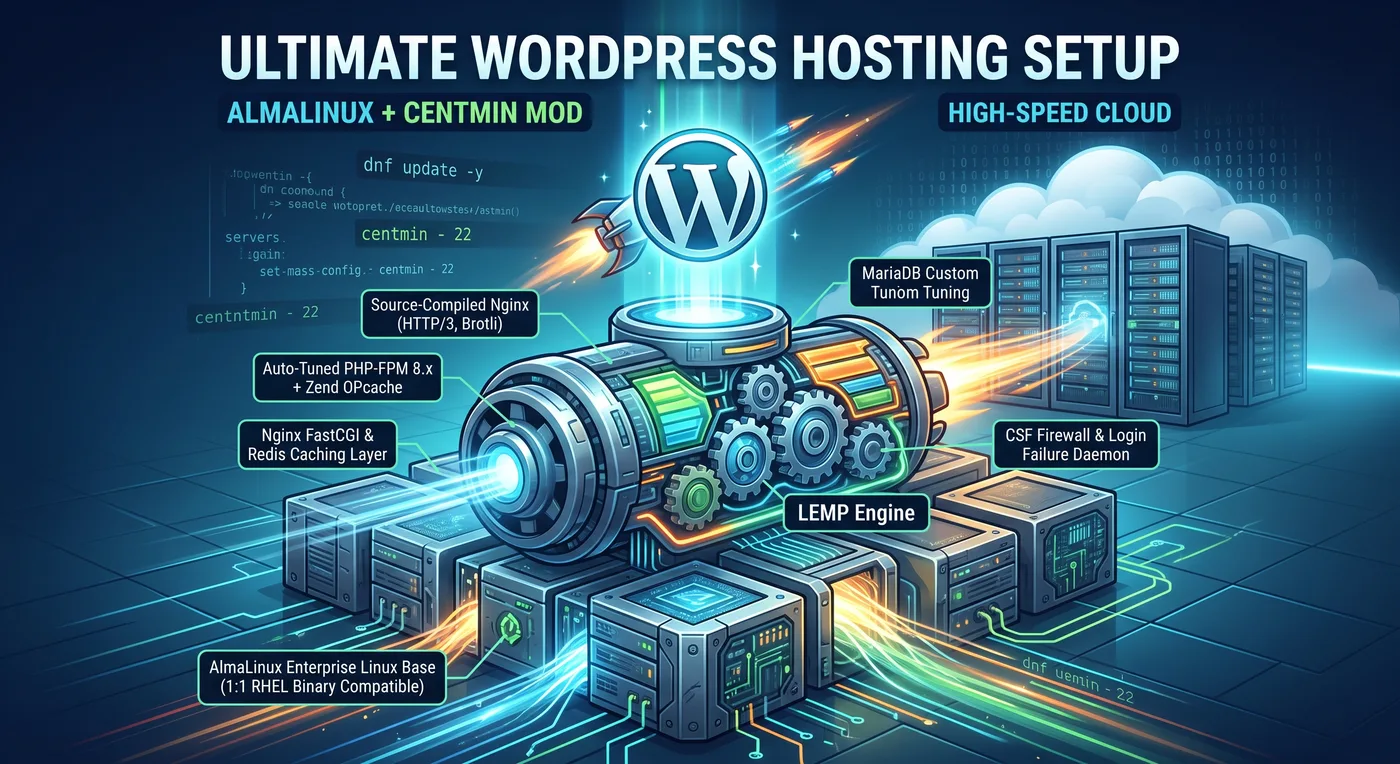
Why AlmaLinux + Centmin Mod is the Ultimate WordPress Hosting Setup (And How to Deploy It)
Discover why combining AlmaLinux with Centmin Mod creates an unmatched, ultra-fast WordPress stack. Follow our step-by-step deployment guide to maximize LEMP performance on high-speed cloud infrastructure.
In high-concurrency enterprise web hosting, sub-millisecond Time to First Byte (TTFB) and low system resource overhead are non-negotiable. Standard web hosting stacks, such as traditional Ubuntu deployments with default Apache or unoptimized Nginx configurations, often struggle under heavy traffic spikes, high database transactions, and dynamic PHP rendering requirements.
To achieve elite performance, modern system administrators and DevOps engineers are turning to a specialized stack: AlmaLinux paired with Centmin Mod.
When hosted on high-performance NVMe Cloud VPS infrastructure, this combination provides a enterprise-grade foundation optimized specifically for WordPress, capable of handling thousands of requests per second with minimal CPU and memory consumption.
Section 1: Why AlmaLinux is the Premier Enterprise Linux Base
Choosing the right operating system is critical when determining the best server OS for WordPress. While Debian and Ubuntu are popular choices, AlmaLinux stands out as the premier Linux distribution for production servers.
1. 1:1 Binary Compatibility with Red Hat Enterprise Linux (RHEL)
AlmaLinux is an open-source, community-governed enterprise operating system built to be 1:1 binary compatible with RHEL. This ensures that every package, kernel patch, and security policy matches RHEL's strict enterprise standards, delivering rock-solid stability without licensing costs.
2. Enterprise Security & Extended Lifecycle Support
Unlike rolling-release distributions or OS branches with short support windows, AlmaLinux offers a 10-year support lifecycle for major releases. Automated security updates, kernel patching via Kpatch, and SELinux integration ensure your underlying server remains secure against zero-day exploits.
3. Lower Resource Overhead vs. Ubuntu/Debian
AlmaLinux operates with a streamlined, lightweight default memory footprint. By eliminating bloatware, snap daemons, and unnecessary background background processes common in default Ubuntu installations, AlmaLinux allocates maximum system RAM and CPU cycles directly to your web server and database layers.
Section 2: The Centmin Mod Advantage
Centmin Mod is an auto-installing, menu-driven LEMP (Linux, Nginx, MariaDB, PHP-FPM) web stack designed explicitly for high-performance Red Hat-based systems like AlmaLinux. Rather than relying on generic OS package repositories, Centmin Mod builds its core services directly from source code.
+-----------------------------------------------------------------------+
|                   AlmaLinux Enterprise Linux Base                     |
+-----------------------------------------------------------------------+
|                      Centmin Mod LEMP Engine                          |
|  +-------------------+  +--------------------+  +------------------+  |
|  | Nginx (Compiled)  |  |  MariaDB 10.x/11.x |  | PHP-FPM 8.x +    |
|  | HTTP/2, HTTP/3    |  |  Custom Tuning     |  | Zend OPcache     |  |
|  +-------------------+  +--------------------+  +------------------+  |
+-----------------------------------------------------------------------+
|  Security & Caching Layer: CSF Firewall + Redis / Nginx FastCGI Cache |
+-----------------------------------------------------------------------+
Key Architectural Highlights of Centmin Mod:
- Source-Compiled Nginx: Centmin Mod compiles Nginx from source code with modules such as HTTP/2, HTTP/3 (QUIC), OpenSSL 3.x, and Brotli compression enabled by default.
- Auto-Tuned PHP-FPM & Zend OPcache: During installation, Centmin Mod inspects your hardware (CPU cores, RAM) and automatically calculates the optimal
pm.max_children,pm.start_servers, and OPcache memory allocations for PHP-FPM. - Nginx FastCGI & Redis Caching: Built-in microcaching options bypass PHP completely for anonymous users, delivering cached HTML directly from RAM at near-static file speeds.
- Integrated Security (CSF Firewall): Centmin Mod automatically deploys and configures ConfigServer Security & Firewall (CSF) alongside
LFD(Login Failure Daemon) to prevent brute-force attacks and port scans. - Native WP-CLI Support: Built-in command-line tools for WordPress deployment and database management simplify developer operations.
Section 3: Performance Comparison Stack
To understand the AlmaLinux LEMP stack performance advantage, consider how Centmin Mod compares against standard alternative setups:
| Feature / Metric | Apache + Ubuntu Default | Generic Nginx + Debian | AlmaLinux + Centmin Mod |
|---|---|---|---|
| Compilation Source | Pre-compiled Binaries | Pre-compiled Binaries | Source-Compiled & Optimized |
| Default TTFB (Cached) | ~150ms - 300ms | ~40ms - 80ms | < 10ms - 25ms |
| Static Compression | gzip | gzip | Brotli + gzip |
| PHP Engine | Mod_PHP / Basic FPM | Basic PHP-FPM | Auto-Tuned PHP-FPM + OPcache |
| Firewall System | UFW (Basic) | iptables | CSF + LFD Pre-Configured |
| Cache Architecture | Apache Module | Manual FastCGI Config | Automated FastCGI / Redis Cache |
Section 4: Step-by-Step Deployment Guide
Follow this guide to install Centmin Mod on AlmaLinux and create a high-speed WordPress environment.
Prerequisites
- A fresh deployment of AlmaLinux 8 or AlmaLinux 9 (64-bit).
- Minimum Hardware: 1 vCPU, 1 GB RAM (2 GB+ RAM recommended for source compilation).
- Root SSH access and a fully qualified domain name (FQDN) pointed to your server IP.
Step 1: Update System Packages and Install Dependencies
Log into your server via SSH as the root user and ensure all base packages are completely updated:
dnf update -y
dnf install curl wget yajl git -y
reboot
After the system reboots, re-establish your SSH connection.
Step 2: Run the Centmin Mod Automated Installer
For production deployments on AlmaLinux, use the latest Centmin Mod branch (124.000stable or 140.000beta01). Execute the automated installer command below:
cd /usr/local/src
xstat=$(curl -sL https://centminmod.com/installer.dat); bash -c "$xstat"
Note: The installation process source-compiles Nginx, MariaDB, and PHP. Depending on your server CPU core count, this process takes approximately 10 to 25 minutes.
Once completed, you will be greeted by the Centmin Mod completion summary containing your MariaDB root password and system credentials.
Step 3: Create an Optimized WordPress Nginx Vhost (Menu Option 22)
Centmin Mod features a dedicated, automated workflow for creating optimized WordPress installations equipped with Nginx FastCGI caching.
To start the main menu, run:
centminSelect option 22 (Add Wordpress Nginx vhost + Cache Plugin):
=========================================================================
 Centmin Mod Menu 124.000stable - https://centminmod.com
=========================================================================
 1).  Centmin Option Shell Functions Menu
 2).  Add Nginx vhost domain
 ...
 22). Add Wordpress Nginx vhost + Cache Plugin
 24). Exit
=========================================================================
Enter option number [1-24]: 22
Follow the interactive installation prompts:
- Enter Domain Name:
example.com - Install WordPress: Type
y - Select Caching Type: Select Option 1 (
Nginx FastCGI Cache) or Option 2 (Redis Cache). FastCGI cache is recommended for raw performance. - Enable Let's Encrypt SSL: Select
yto issue a free, auto-renewing TLS certificate. - Configure WP-CLI Automated Setup: Follow the prompts to set your WordPress administrator username, password, and email address.
Centmin Mod will automatically construct the Nginx configuration block, issue SSL certificates, create the MySQL database, configure PHP-FPM pools, and install the native Nginx Helper plugin within WordPress.
Step 4: Verify Cache Header Performance
Once the setup is complete, verify that centmin mod wordpress nginx cache is active and serving requests directly from memory.
Run the following curl command against your domain:
curl -I https://example.com/Look for the x-cache status header in the HTTP response:
HTTP/2 200
Server: nginx/1.25.4
Date: Mon, 24 May 2024 12:00:00 GMT
Content-Type: text/html; charset=UTF-8
Vary: Accept-Encoding
X-Powered-By: CentminMod
X-Cache: HIT- On the initial request, you may see
X-Cache: MISSorBYPASS. - On subsequent requests, the response header will update to
X-Cache: HIT,confirming that Nginx is bypassing PHP-FPM and MariaDB entirely to serve pages instantly.
Key Takeaways
Combining the enterprise-grade stability of AlmaLinux with the performance engineering of Centmin Mod results in one of the fastest, most reliable WordPress hosting environments available today.
- Unrivaled Efficiency: Source-compiled Nginx and FastCGI caching lower TTFB to single-digit milliseconds.
- Enterprise Security: Built-in CSF firewall, automatic SELinux compatibility, and RHEL binary stability protect your critical applications.
- Automated Management: Centmin Mod's interactive menu (Option 22) simplifies domain configuration, Let's Encrypt SSL issuance, and WordPress deployment.
To get the most out of your AlmaLinux and Centmin Mod stack, deploy it on high-performance AZBrand NVMe Cloud VPS infrastructure, designed specifically to maximize storage I/O and processor speed for demanding web workloads.
Related Architecture Guides
Continue exploring cloud engineering, telecommunications, and infrastructure articles.
Implementing High-Throughput S3 Storage Integration with Custom Edge APIs & Native SDKs
Architect high-concurrency S3 storage pipelines using AZBrand custom REST APIs and native S3 SDKs. Learn direct uploads, 3-step presigned zero-buffer flows, and management integration across Node.js, Python, and Go.
Read guide →Case Study: Building ForgePress with Rust & Svelte
Explore how ForgePress engineered a next-generation CMS with Rust, Axum, Svelte, and sandboxed Rhai/WASM plugins to deliver sub-millisecond page rendering and absolute runtime security. Learn how modern compiled architectures outperform legacy monoliths.
Read guide →Teenovation Case Study: How We Scaled High-Concurrency Workloads and Reduced Latency by 73%
Learn how Teenovation eliminated reconnection storms, N+1 query waterfalls, and database connection pool exhaustion using Flutter, PostgreSQL RPCs, and Cloudflare Edge Workers.
Read guide →